Flight tracking · Buying guide · E-ink
Flight Tracker Display for Your Home: The Options Compared
By Jake · 28 October 2026 · 7 min read
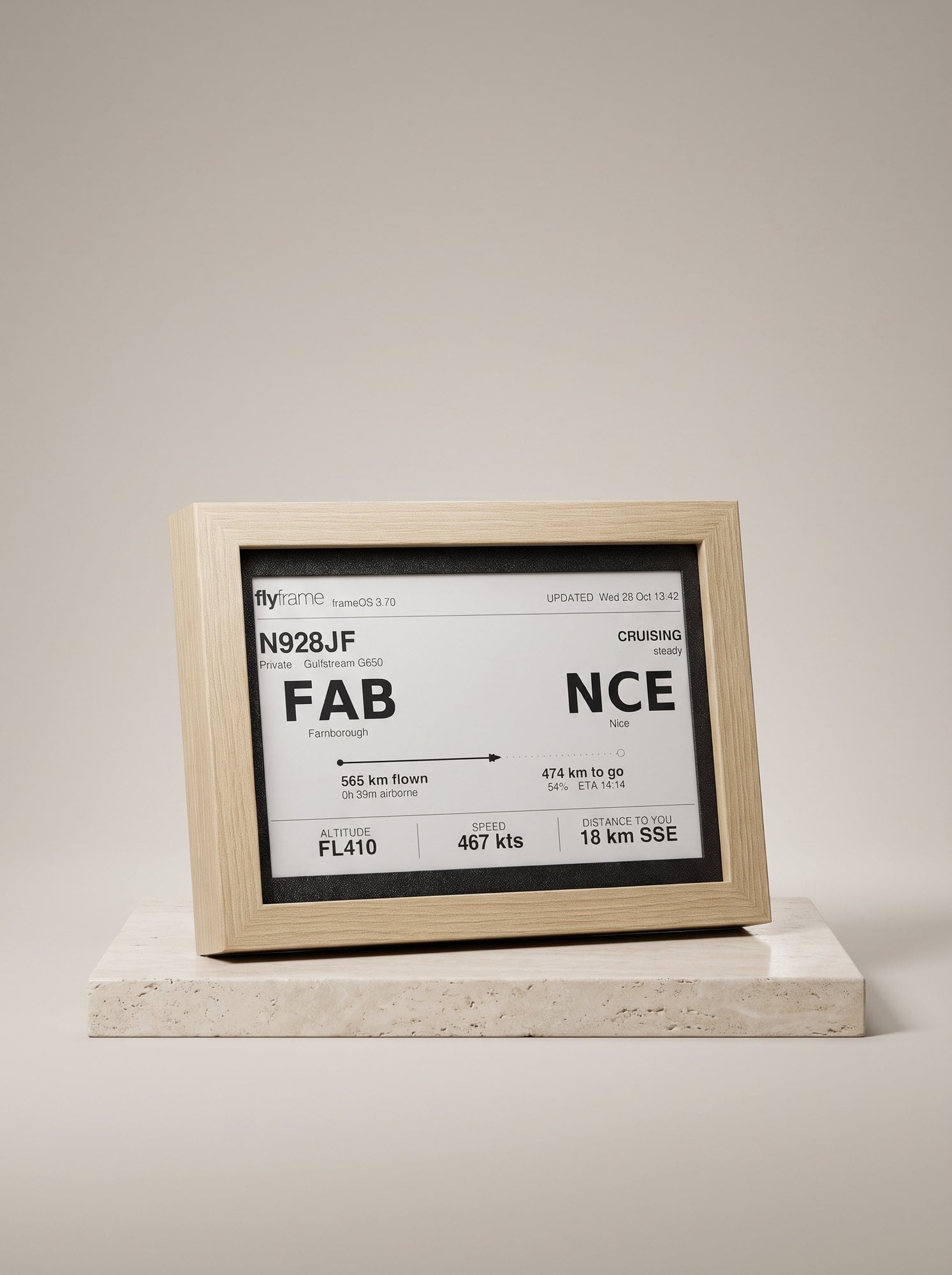
Once you start noticing the planes over your house, you want to know about every one of them. Pulling out your phone each time gets old fast. The answer is a flight tracker display: a screen that sits on a wall, desk or shelf and simply shows what is flying past right now. There are four ways to get one, and they suit quite different people. Here they are, honestly compared.
The short answer: a phone app suits the occasional look, a tablet or DIY build suits people who enjoy tinkering, and a ready-made e-ink frame like FlyFrame suits anyone who wants it always on with no setup fuss.
What a flight tracker display actually shows
Whichever route you take, the core is the same. Aircraft broadcast their position, height and speed, public flight-data services collect those signals, and your display asks for the aircraft near a location you choose. A good display then turns that into something you can read at a glance:
- Who: the airline, flight number and aircraft type.
- Where: the departure and destination airports, when the route is known.
- How: altitude, speed, and how far away it is from you.
- Progress: how far along the journey the flight is.
If you want the background on the signals themselves, our guide on how to tell what plane is flying over your house explains it in plain English.
Option 1: A flight-tracking app on your phone
Best for: the occasional “where's that one going?”.
Free, instant and already in your pocket. Point your phone at the sky or open the map and you have your answer. The catch is that it is never there: you have to unlock, open, wait, zoom. It answers a question but never becomes part of the room, and it is one more reason to look at your phone.
Option 2: A spare tablet on a stand
Best for: trying the idea for free before you commit.
An old tablet running a flight-tracking website, propped on a shelf and left plugged in, is a genuine flight tracker display. It is colourful and detailed. Live with it for a few weeks, though, and the downsides show: it glows at night, the screen dims or locks unless you change settings, apps log out or update, and batteries don't enjoy being on charge forever. It also looks like a tablet, not something you chose for the room.
Option 3: Build your own
Best for: tinkerers who enjoy the project as much as the result.
A small single-board computer, a screen (an LED matrix, a small LCD or an e-paper panel) and some open-source code will get you a working flight tracker. Add an ADS-B receiver and antenna and you can even pick up the signals yourself. It is a brilliant learning project. Go in knowing it takes an evening or a weekend, a bit of comfort with code, and some upkeep when software or data sources change. The finish is down to you: a bare circuit board on a shelf, or a frame you build around it.
Option 4: A ready-made e-ink flight tracker frame
Best for: anyone who wants it on the wall, working, and forgotten about.
This is the category FlyFrame is in. It is a 7.5-inch e-ink display in a picture frame that shows the aircraft passing over a place you choose. You plug it in with USB-C, connect it to your home Wi-Fi from your phone, pick a flight-data source in your dashboard (a free, no-account option gets you going in seconds) and it does the rest. Firmware updates itself, settings live in a web dashboard, and there are no buttons or app to look after.
Because it is e-ink, it looks like a printed page rather than a screen: no glow in a dark room, readable in sunlight, and it fits in with the pictures around it. When the sky is quiet it shows the weather, world clocks or a moment from aviation history instead of an empty map. You can also follow one particular flight by number, which is lovely for watching someone fly home.
The honest trade-offs: it is black and white, it refreshes rather than animates, and it needs a 2.4 GHz home Wi-Fi network. Our page on what an e-ink flight tracker is goes deeper on how it works.
Side by side
| Phone app | Spare tablet | DIY build | E-ink frame | |
|---|---|---|---|---|
| Always on show | No | Yes | Yes | Yes |
| Glows at night | Yes | Yes | Depends on screen | No |
| Setup effort | None | Low | High | Low |
| Ongoing upkeep | None | Some | Some | None |
| Looks like decor | No | No | Up to you | Yes |
| Colour and animation | Yes | Yes | Depends on screen | No |
What to look for in any flight tracker display
- The screen. LCD and LED are bright and colourful but glow. E-ink is calm and paper-like but monochrome. Think about where it will live: a bedroom or living room favours e-ink.
- Where the data comes from. Free public sources are rate-limited, so updates are slower. A display that lets you switch source, or add your own account or receiver, grows with you.
- What it does when no plane is near. Even under a busy flight path there are quiet spells. Weather, clocks or something interesting beats a blank screen.
- How you change settings. Location, radius and views should be easy to change without taking it off the wall.
- Wi-Fi. Many small devices only join 2.4 GHz networks. Most home routers offer it, but hotel or café Wi-Fi with a sign-in page won't work.
- Mounting. Wall, desk or shelf? A display that does both gives you options when you move it around.
Which should you choose?
If you only wonder about a plane now and then, keep the app. If you want to test the idea, prop up a spare tablet for a month. If the fun is in the making, build one. And if you want the sky overhead to quietly become part of your home, or you are buying for a pilot, plane spotter or someone who lives under a flight path, a ready-made e-ink frame is the one you set up once and then just enjoy.
Frequently asked questions
- What is a flight tracker display?
- A flight tracker display is a screen at home that shows the aircraft flying near you in real time: usually the airline, flight number, where it came from, where it is going, its altitude and speed. It can be an app on a spare tablet, a DIY build, or a ready-made device such as an e-ink flight tracker frame.
- Can I use an old tablet as a flight tracker display?
- Yes. A spare tablet on a stand running a flight-tracking app or website works, and costs nothing if you already own one. The trade-offs are a glowing screen, a battery that ages if it is always plugged in, and an app that may log out, update or show ads. It is a good way to find out whether you would use a dedicated display.
- Is it hard to build your own flight tracker display?
- It is a fun project if you enjoy electronics and code: a small single-board computer, a screen or LED matrix, and some software to fetch nearby aircraft. Expect an evening or a weekend to get it working and occasional upkeep when software or data sources change. If you would rather it simply works, a ready-made display is the easier route.
- Why choose e-ink for a flight tracker?
- E-ink reflects light like paper instead of glowing, so it reads easily in daylight, stays calm in a dark room and only uses power when the image changes. The trade-off is that it is black and white and refreshes rather than animates, which suits a display you glance at rather than watch.
- Does a flight tracker display need my own antenna?
- No. Most home displays use a public flight-data service over Wi-Fi, so no antenna is needed. Running your own ADS-B receiver is an optional extra for enthusiasts who want their own data and faster updates.
Keep reading
What Is an E-Ink Flight Tracker? (And Why It's a Great Gift)
An e-ink flight tracker is a wall display showing the aircraft passing over your home in real time. How it works, what it shows, and why it's a great gift.
How to Tell What Plane Is Flying Over Your House
What's that aircraft overhead? Three ways to identify any plane flying over your house: a tracking app, an always-on display, or your own eyes.
Top 10 Aviator Watches: The Best Pilot Watches (2026)
The ten pilot watches worth knowing, from the Breitling Navitimer and IWC Big Pilot to accessible classics, plus what makes a watch a true flieger.